BogeyHunter — The Tracker
The Tracker is a standalone app under the BogeyHunter umbrella. While Coach Mulligan handles your swing in the sim and on the course, The Tracker handles your scorecard, your numbers, and your tee times. Score every round, watch your KPIs trend, and let the Tee Time Hunter keep an eye on openings across the courses you actually play — all stored on your own machine, with nothing sent to any server.
Built and owned by And Beyond Apps, LLC. — the same parent company behind the BogeyHunter coaching platform — The Tracker is a separate product that you can run on its own or alongside Coach Mulligan. Different app, same local-first values.
Desktop Brain, iPhone Scorecard
The desktop is the analytics core: KPI dashboards, course recommendations, the Tee Time Hunter, and an on-device AI that writes your trend narratives. The iPhone companion is the on-course scorecard — fast multi-player entry, photo-to-scorecard OCR, and a Live Activity that surfaces new openings the Hunter has found.
- Desktop (Windows-primary, macOS later) — analytics, AI insights, Tee Time Hunter, course recommender
- iOS companion — digital scorecard, photo OCR, Live Activity for new tee-time openings
- One-time QR pairing in ~3 seconds; sync runs over your home Wi-Fi, signed and verified end-to-end
- Strict local-first — nothing about your game leaves your machine
- Run desktop only, iPhone only, or both — the iPhone app does not require the Mac/PC to function
Score Yourself Plus Up to 3 Partners
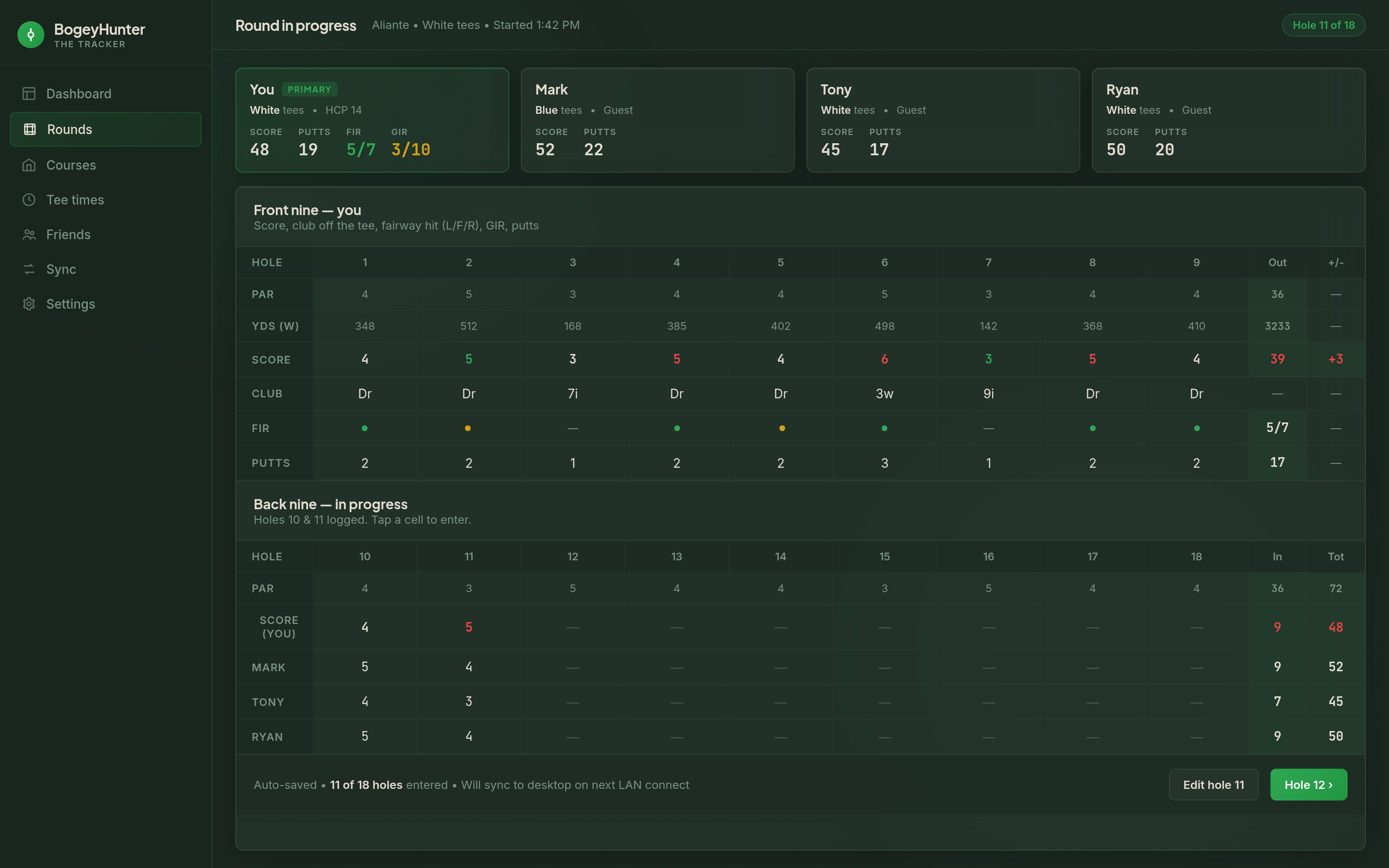
Golf is rarely played solo. The data model treats up to four participants per round as first-class. You enter your full metric suite; for the rest of the foursome, just strokes and putts — fast enough to capture mid-round without slowing play. Frequent friends become real entities with their own scoring history and head-to-head records over time.
- Score yourself plus up to 3 playing partners on the same round
- Per-tee tracking — each player can play different tees in the same group
- Hole-by-hole entry tuned for speed: tap, swipe, next hole
- Full primary metric suite: strokes, putts, fairways with miss direction, GIR, scrambling, sand saves, up-and-downs, club off the tee
- Frequent friends are first-class — head-to-head records, average score, scoring distribution accumulate from minimal entries
Your Numbers, Honestly Charted
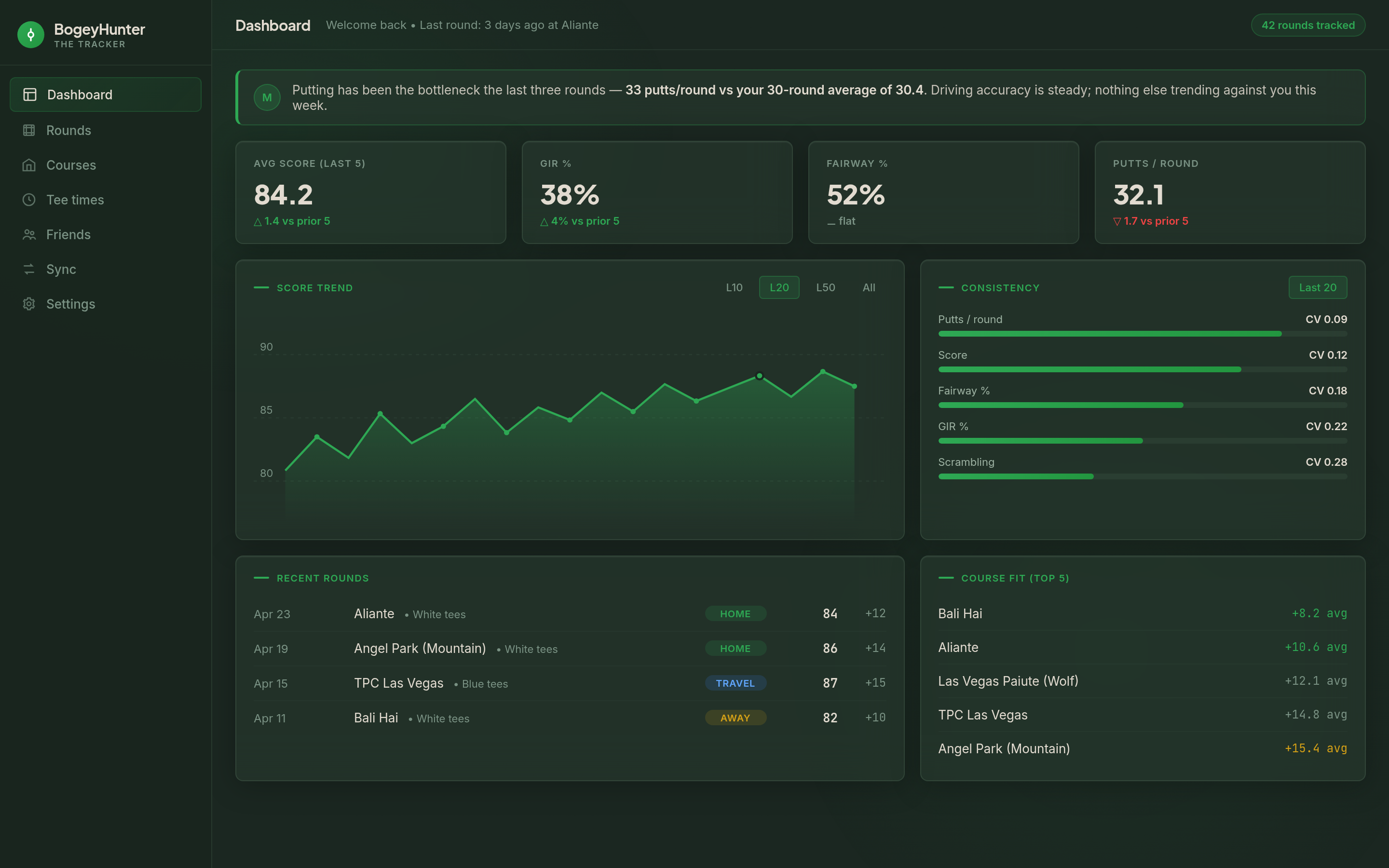
Years of round history rolls up instantly. The dashboards stay smooth even on a low-spec machine. The AI writes the story of your numbers; classical math computes the numbers themselves — so the stats you see are the stats you’d compute by hand.
- Rolling 5-round averages for score, putts per round, putts per GIR
- GIR percentage, fairway accuracy with miss-direction breakdown, scrambling rate, sand saves
- Per-club performance trends from the “club off tee” data captured on the scorecard
- Per-friend trends — your scoring history with each playing partner over time
- Trend narratives written by an on-device AI; the math is never invented
Catch Openings at the Courses You Play
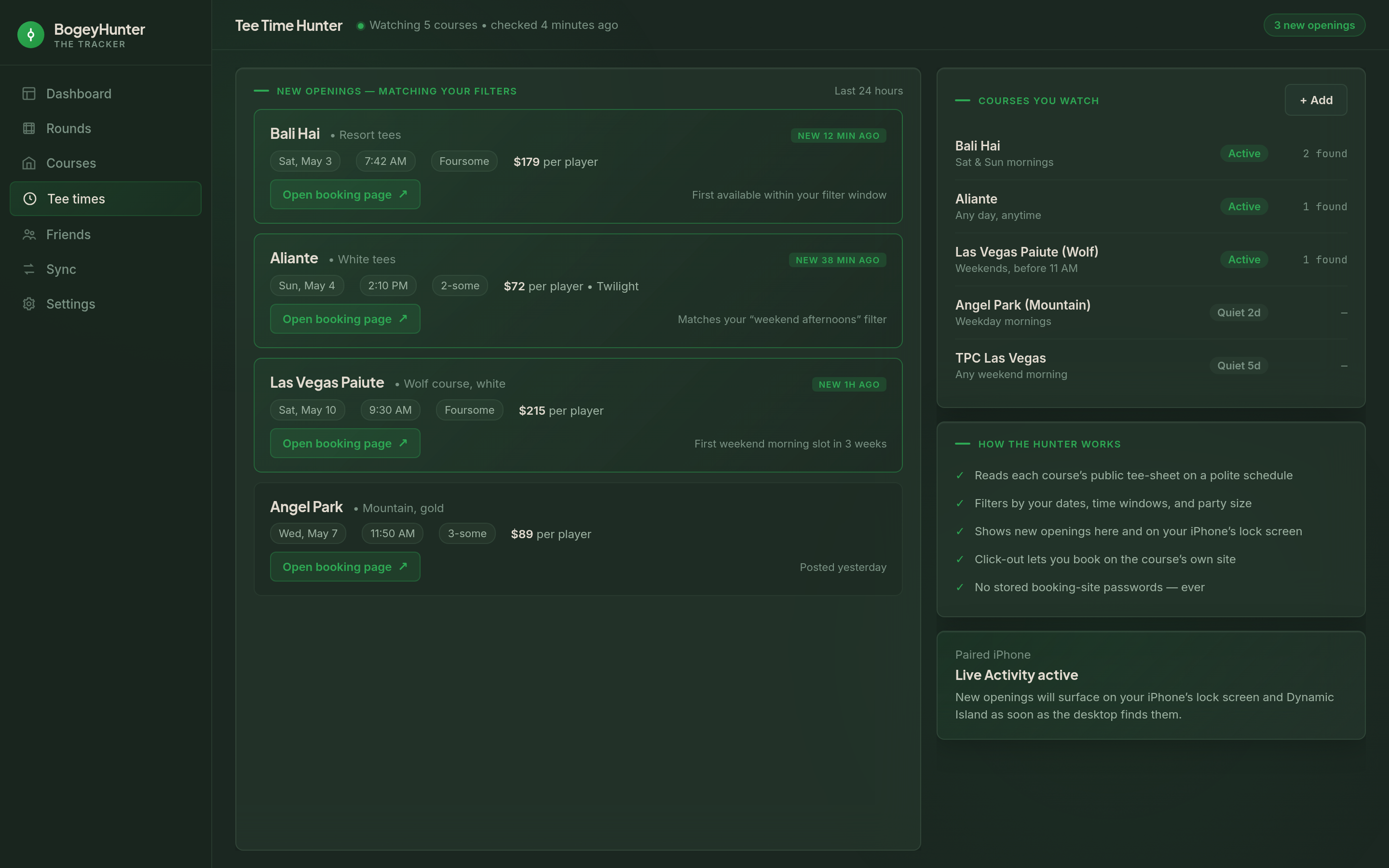
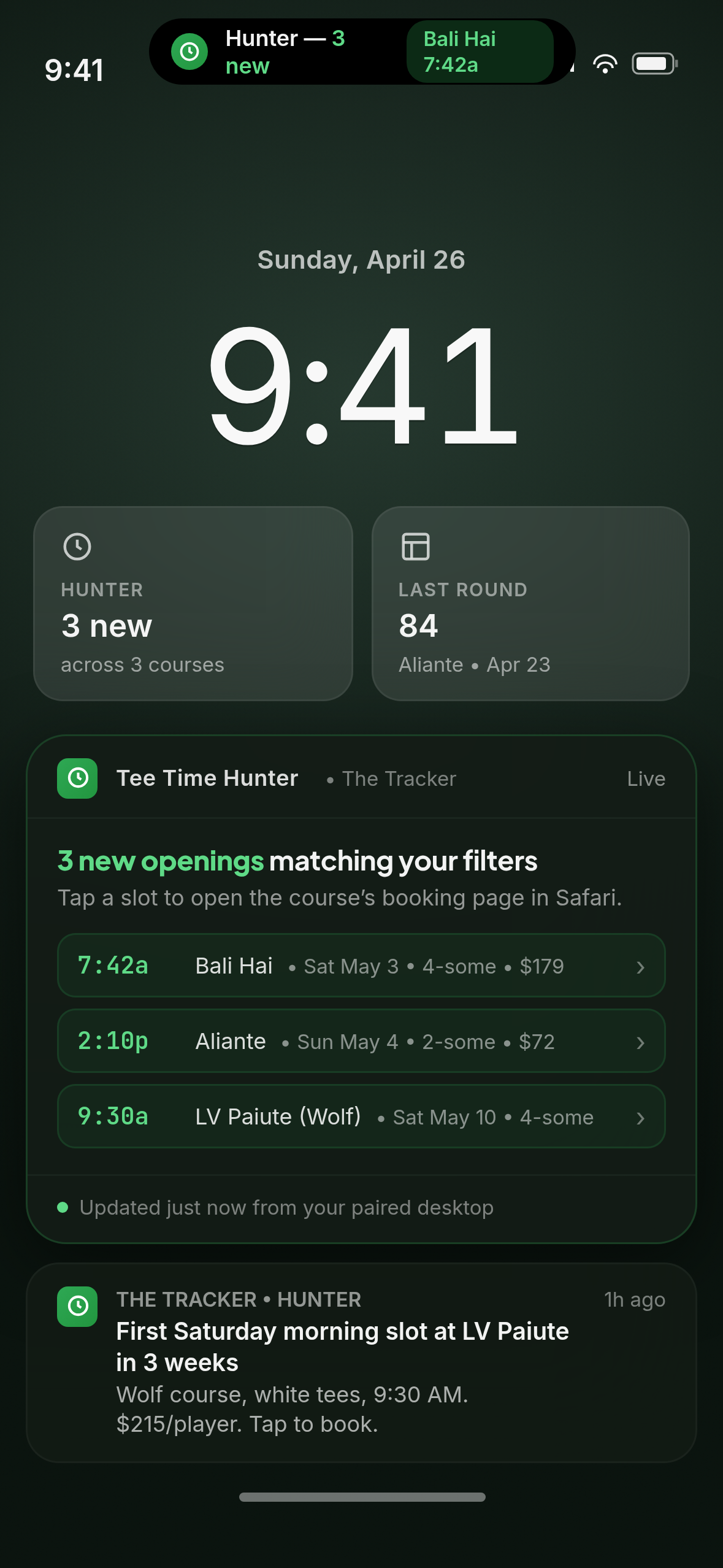
Tell the Hunter which courses you watch, the dates and time windows that work for you, and your party size. When something opens up that fits, you’ll see it on your desktop and on your iPhone’s lock screen. Tap through to the course’s own booking site to lock it in — you stay in control of the reservation.
- Watch the courses you actually play; filter by date, time window, and party size
- New openings show up on the desktop and on your iPhone’s Live Activity
- Tap a slot to jump to the course’s booking page — you complete the reservation yourself
- Dynamic Island summary on iPhone 14 Pro and later
- You don’t hand the app any booking-site passwords — The Tracker doesn’t book on your behalf
Snap the Paper, Skip the Typing
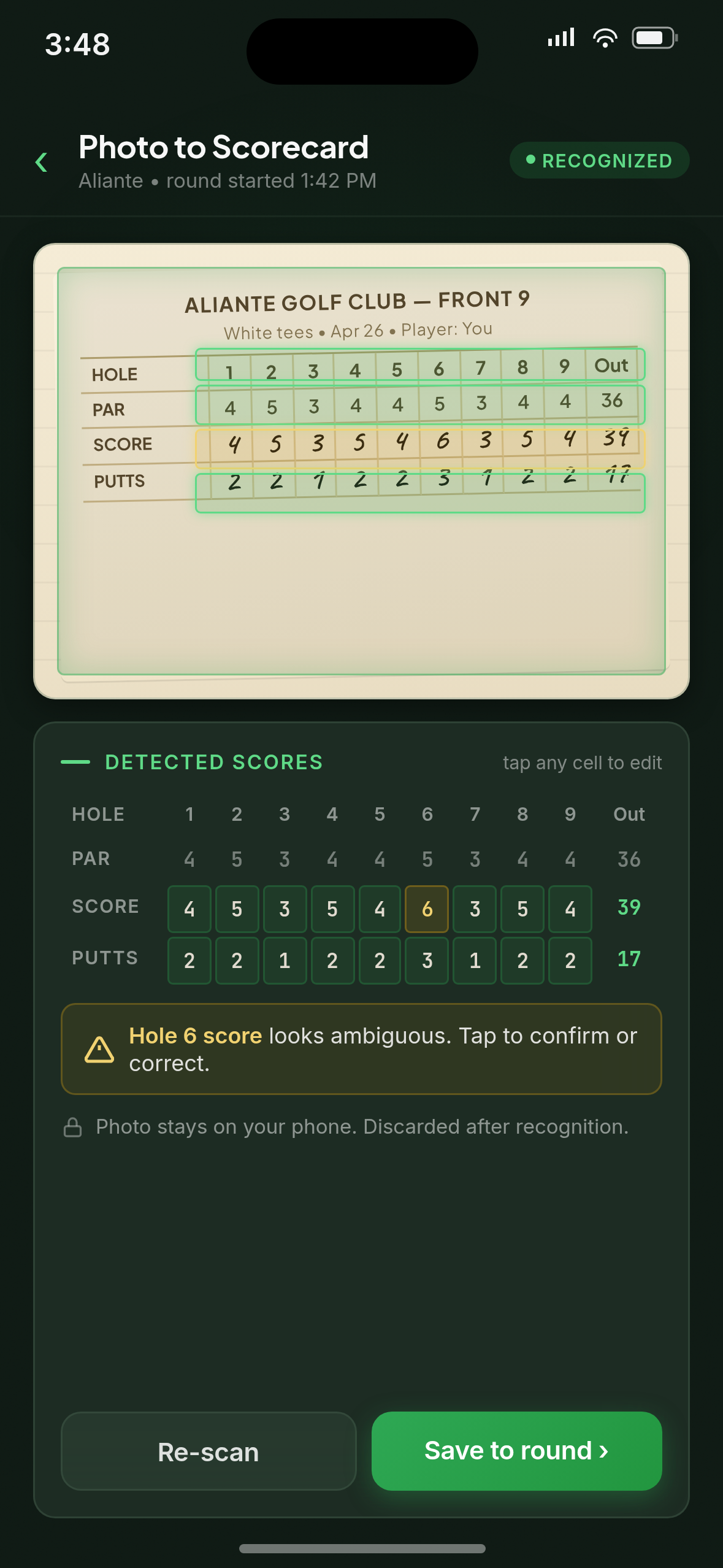
Finished a round on a paper card? Snap a photo. Apple’s on-device text recognition reads the numbers and pre-fills your digital scorecard for review. Photos never leave the phone. The source image is discarded after recognition.
- Fully on-device recognition — no cloud round-trip, no third-party OCR service
- No images uploaded, ever
- Recognized scores land in the scorecard for review and edit before saving
- Source photo discarded after recognition completes
Where Do You Actually Play Best?
A course catalog covering thousands of US and Canadian courses, paired with your own scoring history, lets The Tracker suggest courses that fit how you play — not generic difficulty ratings.
- Bundled course catalog, US + Canada, course-location level
- Course-fit recommender that learns where you score your best
- Per-course history, scoring distribution, and best/worst rounds
- Not a course-tracking app — no hole-level geometry, no shot-by-shot graphics
A Bundled Local AI. No Account. No Download.
A small, capable AI is bundled inside the desktop installer — about 1 GB on disk. No extra account, no first-run download. Inference is accelerated where your hardware supports it, and a low-spec machine is fully supported as a baseline. The AI writes the story of your numbers; classical math computes the numbers themselves.
- Bundled inside the installer — no extra account, no first-run download
- Hardware floor: 4 GB RAM, no GPU required
- The AI never invents a stat — the math is the math
- No data ever leaves your machine for AI inference
No Accounts. No Cloud. No Telemetry.
The Tracker has no sign-up, no account system, and no backend service. Round data is stored on your device and encrypted at rest. The Tracker doesn’t book on your behalf and doesn’t store booking-site passwords — you always complete reservations yourself, on the course’s own site.
- No accounts, no sign-up, no backend — ever
- No stored booking-site passwords — The Tracker doesn’t book for you
- Round and scorecard data encrypted at rest on the desktop
- LAN sync over your home Wi-Fi — never via the cloud
- One-time QR pairing for desktop ↔ iPhone — ~3 seconds, no cloud key escrow
- iPhone rounds are protected by iOS file-level encryption whenever the device is locked
Read the full Tracker privacy disclosures → · Encryption & export compliance →
About This App
BogeyHunter — The Tracker is a separate product from the BogeyHunter coaching platform. The Tracker focuses on scoring, KPIs, tee times, and round-management workflows. Coach Mulligan’s desktop coaching platform and the Coach Mulligan iOS app are different apps with different system requirements.
The Tracker is rated 4+ (Suitable for All Ages) on the Apple App Store. No advertising, no in-app purchases, no social features, no tracking SDKs. View full age rating details →
Owned and operated by And Beyond Apps, LLC.